Your team can ask the kinds of questions they would otherwise pull several reports to answer. Continue the conversation with follow-up questions in natural language to drill deeper. ProEPOS reads your data and replies with a clear, formatted summary. A few of the things people ask:
ProEPOS Intelligence AI built into the heart of the EPOS
Natural-language reporting, a conversational product-file assistant and delivery-note capture, all built directly into ProEPOS. Powered by your choice of leading AI model, with every change reviewable before it is committed.
- Powered by Anthropic Claude, Google Gemini or OpenAI GPT
- Ask questions in plain English, no report builder needed
- Reviewable and undoable, always in your control
- Available now as a premium add-on

AI Capabilities
Three ways AI works
Three ways AI works
inside ProEPOS
Intelligence woven into the fabric of the EPOS, enhancing the user experience like never before
Natural-Language Reporting
Query your data the way you think about it
Skip the report builder entirely. Ask a question in plain English and ProEPOS returns instant, formatted analysis with KPIs, insights and summaries. Have the output emailed to you on a schedule or exported as HTML.
- Plain-English questions, no report builder required
- Every report auto-summarised in plain English
- Highlights anomalies, outliers and risks worth your attention
- Suggests concrete next steps to improve performance
- Email on a schedule or export as HTML
Product File Assistant
Manage your product file by conversation
Filter the Manage Stock Lines view, then describe the change you want across that set. The assistant actions it directly in the grid and hands the changes back for you to approve. Commit or undo, as usual.
- Margins, suppliers, pricing rules and naming conventions
- Apply a margin floor across the filtered set
- Change supplier, capitalise names or round prices in one go
- Changes applied directly in the grid
- Reviewable before commit, with full undo
Delivery Note Capture
Photograph a delivery note and let AI do the keying
Take a picture of a delivery note and the AI model reads the products and quantities, then populates goods-in on the system for you. Review the matched lines and post them to stock. No manual keying.
- Capture a delivery note with any device camera
- AI extracts products and quantities automatically
- Lines matched to your existing product file
- Goods-in populated for you, ready to confirm
- Review before posting to stock
Just ask
Ask anything sensible.
Ask anything sensible.
Get answers.
- How did last week's sales compare to the previous week?
- Has there been any suspicious or unusual activity this week?
- Can you give me a breakdown of our stock holding?
- Give me an analysis of staff sales performance for last month.
- What hours of the day would you recommend I increase staff cover?
Summarise
A concise plain-English overview of what the report shows.
Highlight issues
Spots anomalies, outliers and risks worth your attention.
Suggest actions
Concrete next steps to improve store performance.
Goods-in
Snap a delivery note.
Snap a delivery note.
Goods-in, done.
Booking in a delivery is one of the most tedious jobs in the shop. With ProEPOS Intelligence you take a photo of the delivery note and the AI model picks out the products and quantities, then populates goods-in for you to check and confirm.
- Photograph the note with any device camera
- AI reads the products and quantities
- Lines matched against your product file
- Review the matched lines, then post to stock
1. Capture
Take a picture of the supplier delivery note.
2. Extract
The AI model picks out every product and quantity.
3. Confirm
Check the goods-in and post it straight to stock.
Delivery note capture
From photo to goods-in,
From photo to goods-in,
step by step
Here is the delivery-note capture running inside ProEPOS, using a real supplier delivery.
1
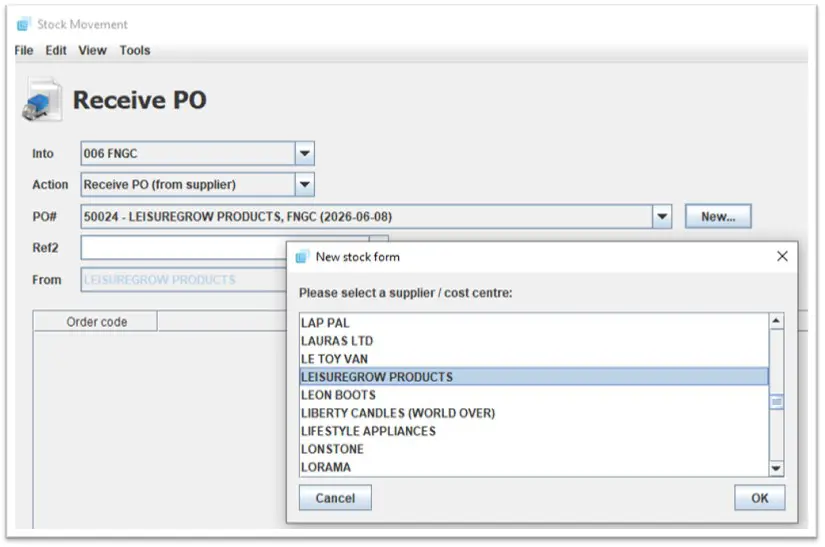
Start a delivery note
Create a blank delivery note on the system, exactly as you would for any goods-in.
2
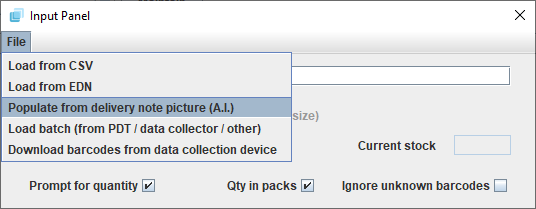
Choose 'populate from image'
Open the Scan / Input panel and select the option to populate the delivery note from an image.
3
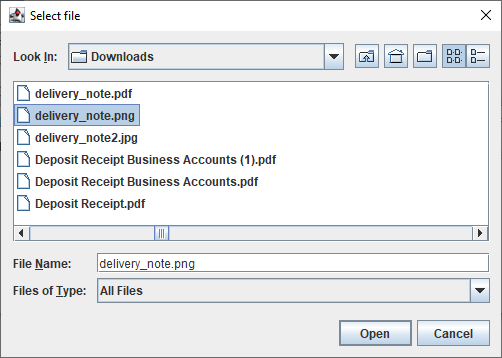
Select the photo
Pick the photo of the delivery note. JPG, PNG and similar formats are all supported.
4
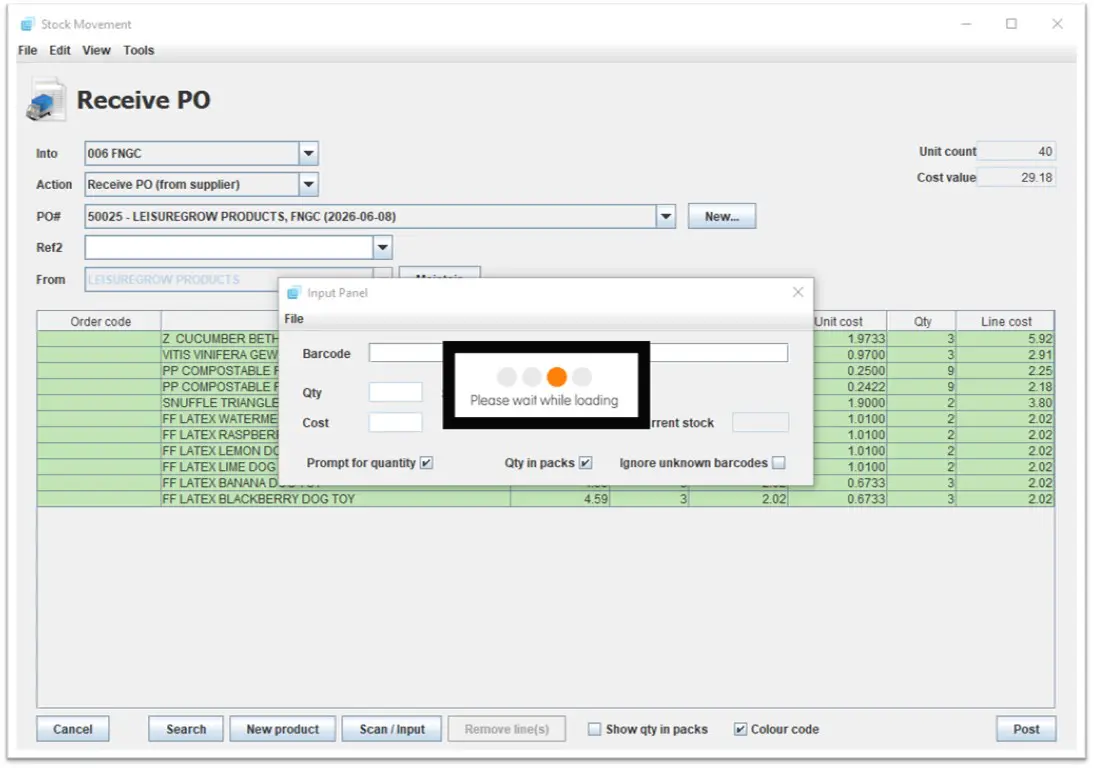
AI fills the form
The AI model reads the photo and populates the stock form automatically.
5
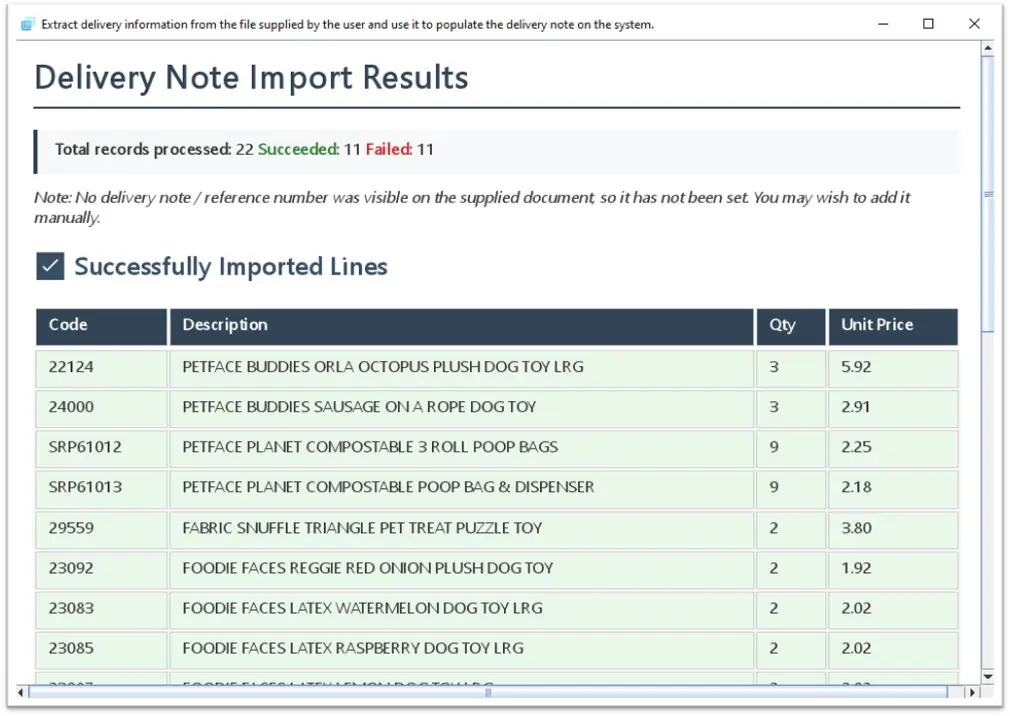
Review the import report
An import report confirms every line that was matched and brought in successfully.
6
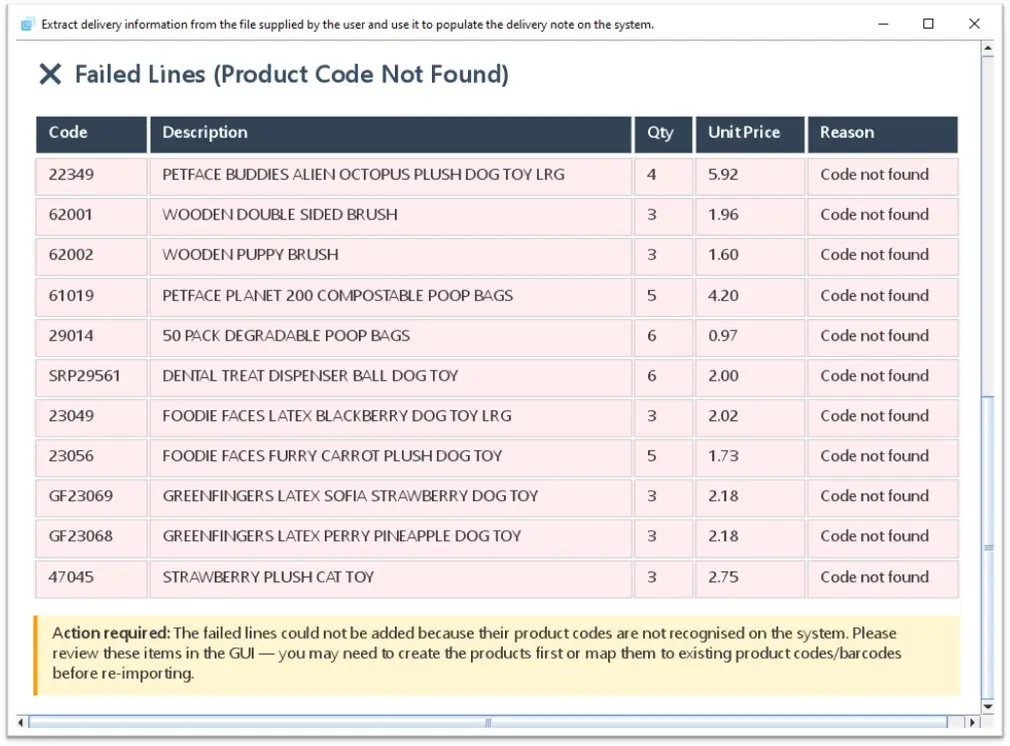
Check the flagged lines
Any lines it couldn't match are flagged with a reason, so you can review before posting.
Why it matters
Less clicking.
Less clicking.
More knowing.
ProEPOS Intelligence turns your data and product file into a conversation.
🗣️
Plain-English queries
Ask anything sensible about your data and get a clear, formatted answer back.
📝
Auto summaries
Every report comes with a concise overview, written in plain English.
🔍
Anomaly detection
Flags suspicious or unusual activity and the outliers worth a closer look.
🛠️
Bulk product edits
Action changes across your filtered stock lines just by asking for them.
💷
Margin and price rules
Apply margin floors, supplier changes and rounding rules in a single step.
↩️
Reviewable and undoable
Nothing commits until you approve it, and you can undo at any time.
Bring AI to your
ProEPOS system
ProEPOS Intelligence is available now as a premium add-on. Talk to us about switching it on for your stores.
Powered by Anthropic Claude, Google Gemini or OpenAI GPT